


Kilo Code Overview
Kilo Code is an open-source AI agent extension that can be integrated into VS Code.
Kilo Code is available as a VS Code extension, so it’s also available in VS Code-based Cursor.
It offers a range of development assistance features, including natural language code generation, task automation, refactoring, bug fixing, and documentation generation.
Main modes
- Orchestrator mode: Break down complex projects into subtasks and assign them to each mode of responsibility to manage processing.
- Architect mode: Plan designs and structures before writing code.
- Code mode: Implement based on design.
- Debug mode: Supports finding and fixing bugs.

Other useful features
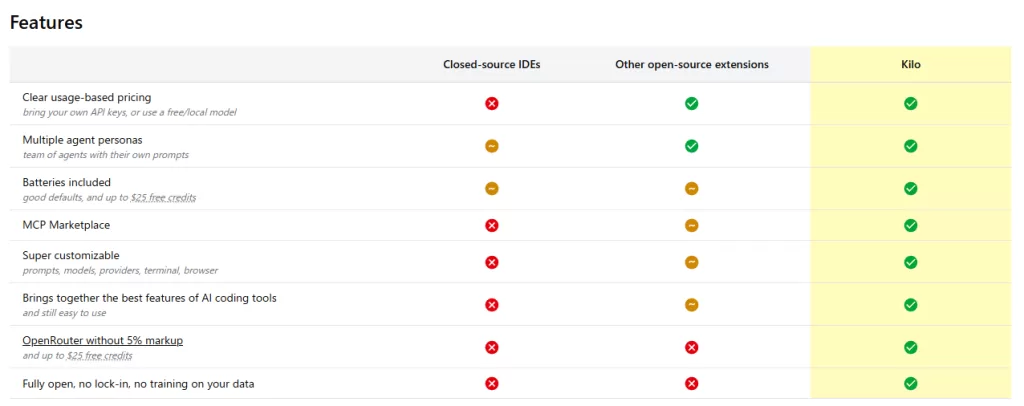
- Source-Powered Code Accuracy: Utilize Context7 and refer to the library’s official documentation to generate reliable code based on real-world APIs.
- Error recovery function: Automatically run tests and automatically attempt to recover when problems occur.
- No API key required or free: You can prepare your own API key or use a local model. You will receive up to $25 in free credits.
- Model Context Protocol (MCP) Marketplace: A marketplace for JSON-based integration of external tools and custom features.
- Personal customization: You can freely customize prompts, models, modes, and environment settings for a flexible development experience.
Advantages as an open source
- It is a fork of Roo Code and Cline, and it is evolving while integrating the best of both worlds.
- It is published under the Apache 2.0 license and is free for anyone to use, modify, and contribute.
License: Apache 2.0
GitHUB:https://github.com/Kilo-Org/kilocode
How free and paid use works
- The Kilo Code itself is available free of charge. In addition to being able to try it out with free credits, you can also use a paid model and specify your own API key.
Kilo Code Official FAQ: https://kilocode.ai/docs/faq
Illustration: The Kilo Code
[ VS Code ]
     │
     ├── Orchestrator モード
     │     ├── Architect → 設計
     │     ├── Code → 実装
     │     └── Debug → バグ修正
     │
     ├── Context7によるAPIドキュメント参照
     ├── 自動テスト/エラー回復
     ├── モデル:ローカル or 各種API(最大$25無料クレジットあり)
     ├── MCP Marketplaceによる拡張性
     └── カスタマイズ対応(モード・プロンプト・設定など)
OpenRouter App Ranking No. 1 (as of August 20, 2025)
OpenRouter is ranking No1 in the Apps ranking tracked by OpenRouter.

How to install Kilo Code on VS Code (Mac/Windows/Linux)
precondition
VS Code must be installed
Formula: https://code.visualstudio.com/
Git must be installed
Formula: https://git-scm.com/
Node.js (v18 or later) Recommended (required for some script execution)
Installing Kilo Code
How to install from the Visual Studio Marketplace
Install from the following Visual Studio Marketplace links:
Visual Studio Marketplace – Kilo Code
https://marketplace.visualstudio.com/items?itemName=kilocode.kilo-code

How to install from the official Kilo Code website

Select VS Code. (If you are using Cursor, you can also choose Cursor)

How to install from VS Code
- Click on the extension icon (square block) in the left sidebar of VS Code
- Type “Kilo Code” in the search bar
Kilo Codeand press the “Install” button

How to install from Cursor
- Click on the extension icon (square block) in the left sidebar of Cursor
- Type “Kilo Code” in the search bar
Kilo Codeand press the “Install” button

Setting up Kilo

Sign up on Google or GitHub.

You have been awarded $5 in AI credits.


References
- Kilo Code Official Website
https://kilocode.ai/ - Kilo Code Documentation (including FAQs)
https://kilocode.ai/docs/ - Kilo Code GitHub Repository (Source Code License)
https://github.com/Kilo-Org/kilocode - Visual Studio Market Place: Kilo Code AI Agent (Roo / Cline fork)
https://marketplace.visualstudio.com/items?itemName=kilocode.kilo-code - Kilo Code Youtube : Just Signed Up? Your first 14 minutes with Kilo Code
https://www.youtube.com/watch?v=pO7zRLQS-p0





Comments